Draft -> publish workflow
Every config write produces a draft. The draft becomes a published
version only when you explicitly click Publish (or POST /publish).
Only a published version ever runs; your draft is never executed.
The model
+----------------+        +-----------------------+        +-----------------------+
|                | PATCH  |                       | POST   |                       |
|  Dashboard     +-------->  draft                +-------->  version N+1          |
|  AI agent      |/draft  |  (one per connector,  |/publish|  (append-only history,|
|  CLI           |        |   mutable)            |        |   exactly one active) |
|  MCP server    |        |                       |        +----------+------------+
+----------------+        +-----------------------+                   |
                                                                      v
                                                            the running connector
                                                            (usually switches over
in a few seconds)Invariants:
- Single write path. Every writer (dashboard, AI agent, CLI, MCP) goes
through
PATCH /api/connectors/{id}/draftor one of the granular helpers below. No endpoint mutates state by side effect. Writing an event source’s definition through/sourcesis the same path seen from another door: it lands in the draft and answers202(see EventSources). - The draft never runs. Nothing you save is in effect until you publish it, so an unfinished edit cannot reach HubSpot or your target system.
- Atomic publish. Either version N+1 exists in full or nothing changed:
there is no half-published config. The running connector usually picks the
new version up within a few seconds.
GET /api/connectors/{id}/versions/activetells you which version is live,GET /api/connectors/{id}/versionsthe whole history. - Immutable history. Every published version is strictly immutable.
Endpoints
| Endpoint | Verb | Purpose |
|---|---|---|
/api/connectors/{id}/draft | PUT | Replace the entire draft config. |
/api/connectors/{id}/draft | PATCH | Partial draft update: RFC 7396 merge patch over the current draft, same semantics as the source PATCH (see event-sources.md). |
/api/connectors/{id}/draft/entities/{name} | PUT | Upsert a single entity in the draft. |
/api/connectors/{id}/draft/entities/{name} | DELETE | Remove a single entity from the draft. |
/api/connectors/{id}/draft/entities/{name}/discard | POST | Revert one entity in the draft back to the published version. |
/api/connectors/{id}/draft/flows/{name} | PUT | Upsert a single event flow in the draft. |
/api/connectors/{id}/draft/flows/{name} | DELETE | Remove a single event flow from the draft. |
/api/connectors/{id}/draft/sources/{name} | PUT | Upsert a single event source definition ({type, config}) in the draft. |
/api/connectors/{id}/draft/sources/{name} | PATCH | Merge into one source definition’s config: RFC 7396 merge patch. |
/api/connectors/{id}/draft/sources/{name} | DELETE | Remove a single source definition from the draft. 409 while a flow of the same draft still names it. |
/api/connectors/{id}/draft/flows/{name}/dry-run | POST | Run a draft flow against stub clients; no external system is touched. An associate step whose endpoints were not upserted in the same rehearsal reports not_verifiable (the stub starts with no identity mapping), not an error; the remaining steps keep rehearsing. A plugin step (plugin.logical_name) is never invoked, live or via any fallback path — it is reported as not_executed: true with a not_executed_reason, and the rehearsal keeps going past it (see plugins/dev-loop.md for why, and plugsync plugin invoke for actually exercising the handler). Any step that hit the stub HTTP client (e.g. a post/identity-aware upsert to a non-HubSpot target) is flagged stubbed_external_response: true — its response never came from the real target; a source’s config.outbound.dry_run_response shapes that stub’s body (see entities.md, “identity_response_path resolution root”). A delete step against a REST destination resolves the id to delete from the identity map, which is empty here: the rehearsal simulates that mapping so the request (url, method, headers) is actually exercised, and flags the step simulated_identity: true with a simulated_identity_note. The external id in that url is invented (prefix dry-run-external-id-) and a green outcome is no proof the record is mapped — at runtime an unmapped record makes the same step a silent no-op, which the trace still reports on its own as reason: "no_identity_mapping" without the flag. |
/api/connectors/{id}/draft/settings | PATCH | Partial update of config.settings: RFC 7396 merge patch. |
/api/connectors/{id}/publish | POST | Publish the current draft as the next version. |
The publish body is optional and every field in it is optional:
change_summary (a note stored with the new version), force (below), and
the deprecated new_sources/delete_sources (see further down). The version
the draft was started from is not part of the request: the draft tracks it
as base_version (shown in GET /draft) and the publish checks it, see
“Concurrency” below.
The read endpoints behind the dashboard’s editor (the draft itself, the preview of a publish, preflight, the version history and the field mapping suggestions) are in Reading the draft and the history. When it is enabled for your organization, a publish that would create HubSpot properties or pipelines also needs a publish review.
Forcing a re-publish on an identical draft
POST /publish normally answers no_changes: true and creates nothing when
the draft is byte-identical to the active version. That check compares
authored text, but a publish also resolves values that can drift on their
own without any draft edit: a plugin promoted to a new version, a
per-connector plugin override changed, a HubSpot property removed by hand on
the portal since the last publish. Passing force: true in the body
publishes a new version anyway, re-running the whole pipeline (plugin
resolution, HubSpot schema provisioning, warnings) against the config as it
resolves right now; the new version’s change_summary defaults to
“Re-publish (forced)” when you do not supply one and there was no organic
draft change.
GET /preview’s resolved_changes list tells you whether a forced
re-publish would actually change anything before you use it: it diffs the
active version’s already-resolved plugin coordinates against what publishing
now would resolve, a comparison the regular changes list intentionally
skips. The dashboard exposes the same forced re-publish without the API or the
CLI: the Review changes drawer shows that list and, when the draft has no
changes of its own, a Re-publish button that applies it (see “Dashboard
walkthrough” below). See
plugins/promotion.md
for the plugin-specific cases this covers, and when the platform already
refreshes things for you without a re-publish.
Reading the draft and the history
The read side of the workflow is what the dashboard’s editor and its
Review changes drawer are built on. None of these endpoints changes the
draft or the active version, and all of them are open to any member of the
organization and to the organization API key; a connector of another
organization answers 404, like one that does not exist.
| Endpoint | Verb | Purpose |
|---|---|---|
/api/connectors/{id}/draft | GET | The draft, with its revision counters. |
/api/connectors/{id}/preview | GET | What publishing the draft now would change, compared with the active version. |
/api/connectors/{id}/preflight | GET | Advisory checks of the draft, including checks against the HubSpot portal. |
/api/connectors/{id}/publish-review | GET | The HubSpot properties and pipelines the publish would create (see Publish review). |
/api/connectors/{id}/versions | GET | Every published version, newest first, without their config. |
/api/connectors/{id}/versions/active | GET | The version that is running. 404 before the first publish. |
/api/connectors/{id}/versions/{version} | GET | One published version, with its config. |
/api/connectors/{id}/versions/{from}/diff/{to} | GET | What changed between two published versions. |
/api/connectors/{id}/draft/entities/{name}/field-mapping-suggestions | GET | Suggested field mappings for one entity of the draft. |
GET /draft
{
  "config": { "version": "3.1", "entities": [], "flows": [], "settings": {}, "sources": [] },
  "base_version": 4,
  "draft_version": 17,
  "updated_at": "2026-10-14T09:02:11.530000+00:00",
  "updated_by": "jane@example.com",
  "has_changes": true,
  "direction": "inbound",
  "flow_directions": { "order_created": "inbound" },
  "warnings": []
}| Field | Meaning |
|---|---|
config | The draft config, as the next publish would take it. |
base_version | The version that was active when the draft was started; the publish checks it (see Concurrency). |
draft_version | The draft’s revision, raised by every write. Pass it as expected_version on a write, and as draft_version to confirm a publish review. |
updated_at, updated_by | The last write and who made it. |
has_changes | true when the draft differs from the active version. |
direction | inbound, outbound or bidirectional, derived from the flows; null while the draft has no flows. flow_directions gives the same reading per flow. |
warnings | Non-blocking findings on the saved draft: today only the config size. |
The first GET on a connector that has no draft yet creates an empty one,
which declares the connector’s existing sources.
GET /preview
{
  "has_changes": true,
  "changes": [
    { "type": "entity_modified", "detail": "Field mappings changed", "entity": "contact", "event_flow": null, "source": null },
    { "type": "event_flow_added", "detail": "New event flow", "entity": null, "event_flow": "order_created", "source": null }
  ],
  "resolved_changes": []
}
Each entry of changes has a type, a human-readable detail and the name
of what it concerns in entity, event_flow or source. The type names
the part of the config and what happened to it: entity_, event_flow_,
source_, conflicts_, pipelines_ and ingress_profile_ followed by
added, modified or removed, and settings_modified. Treat the list
of types as open: a new part of the config brings its own.
resolved_changes lists what a publish would resolve differently from the
active version without any draft edit (see
Forcing a re-publish). It is
never counted in has_changes, and it is empty before the first publish.
GET /preflight
{
  "errors": [],
  "warnings": [
    {
      "severity": "warning",
      "code": "enrich_properties_gap",
      "message": "Flow 'contact_updated' reads $.payload.object.properties.vat_number but source 'hubspot' enrich_properties does not list ['vat_number']: ...",
      "field": "flows[contact_updated].steps",
      "suggestion": null,
      "entity": null,
      "event_flow": "contact_updated",
      "reauthorize_scopes": null
    }
  ],
  "infos": []
}
Preflight always answers 200: every problem it finds is a finding, sorted
into errors, warnings and infos by severity. Each finding names its
code, a message, the field and the entity or event_flow it
concerns, and when there is one a suggestion. reauthorize_scopes is set
only on findings about the HubSpot connection’s scopes: the scopes to grant
when reconnecting.
Preflight is advisory: POST /publish does not read it. A few of its errors
describe a check that the publish runs on its own, so the publish will be
refused for the same reason: a flow or step naming a source or entity the
config does not declare, or a config over the size limit. plugsync push --publish runs preflight first and does not publish when it reports an
error.
?credential_id=<id> runs the portal checks against another HubSpot
connection of your organization instead of the one the connector uses, for
example before moving the connector to another portal. Nothing is changed:
the connector stays on its portal. A credential of another organization
answers 404 ("Credential not found"), and one that is not a HubSpot
connection answers 422 with credential_not_hubspot_oauth.
Versions
GET /versions lists every published version, newest first:
[
  {
    "id": "c0a8...",
    "version": 5,
    "published_at": "2026-10-14T09:10:02.411000+00:00",
    "published_by": "jane@example.com",
    "change_summary": "Map the VAT number",
    "is_active": true
  }
]
GET /versions/{version} and GET /versions/active return the same fields
plus the version’s config. An unknown version answers 404 with
"Version N not found".
GET /versions/{from}/diff/{to} compares two published versions and
answers {"from_version", "to_version", "changes"}, where changes has the
same entries as in GET /preview. from and to must be two different
versions that both exist: otherwise the answer is 404 with
"One or both versions not found". To see what the draft would change, use
GET /preview instead.
Field mapping suggestions
GET /draft/entities/{name}/field-mapping-suggestions?hubspot_object_type=contacts
suggests, for every field of the entity’s source payloads, the HubSpot
property to map it to. It is what the field mappings editor shows next to
each field. It never writes the draft: accepting a suggestion is a normal
draft write.
{
  "entity": "contact",
  "hubspot_object_type": "contacts",
  "source_names": ["shop_webhook"],
  "suggestions": [
    {
      "source_field": "email",
      "hubspot_property": "email",
      "confidence": 0.95,
      "reasoning": "'email' matches HubSpot property 'email' exactly.",
      "create_custom_property": false,
      "suggested_property_name": null
    },
    {
      "source_field": "loyalty_tier",
      "hubspot_property": null,
      "confidence": 0.0,
      "reasoning": "No existing HubSpot property matches 'loyalty_tier'. Suggest creating a custom property 'loyalty_tier'.",
      "create_custom_property": true,
      "suggested_property_name": "loyalty_tier"
    }
  ],
  "message": null,
  "error": null
}hubspot_object_typeis required: the HubSpot object whose properties are matched, read from the portal the connector is connected to.- The source fields come from the sample payloads captured when events
arrive, taken from the sources whose flows write the entity
(
source_names). When no flow writes the entity yet, the samples of every source are used andsource_namesis["*"]. - A field is matched by exact name (
confidence0.95), then by known synonyms (0.85), then by name similarity (from0.3to0.8). A field with no match hasconfidence0,hubspot_property: null,create_custom_property: trueand asuggested_property_name. - Samples are read first, then the HubSpot connection. With no field to
suggest from,
suggestionsandsource_namesare empty andmessagesays why: no sample captured yet on the connector, samples only for sources that do not feed this entity, or payloads with no mappable fields. Send a test event through one of the entity’s sources and ask again. - When the organization has no HubSpot connection, the answer is still
200, withsuggestionsandsource_namesempty anderrorset. - An entity that is not in the draft answers
404.
Body contract for granular writes
Every write below expects its payload flat: the config/patch object
itself, directly as the request body — no top-level wrapper key, the same
convention as POST /sources. This is the one place that contract is
documented.
| Endpoint | Body shape | Notes |
|---|---|---|
PUT /draft | <full v3 connector config> | Replaces the draft wholesale. |
PATCH /draft | <RFC 7396 merge patch> | Deep-merged into the current draft; null values delete keys. |
PUT /draft/entities/{name} | <entity object>, with an optional top-level auto_flow: {"source": ..., "event_type": ...} sibling key | auto_flow is only honored when the org’s simple_mode_autoflow flag is on; omit it otherwise. It is pulled out of the body before the rest is saved as the entity config — never persisted as an entity field. |
PUT /draft/flows/{name} | <event flow object> | |
PUT /draft/sources/{name} | {"type": ..., "config": {...}} | The name comes from the path, not the body. |
PATCH /draft/sources/{name} | {"config": <RFC 7396 merge patch>} | Merged into that source’s declared config only. |
PATCH /draft/settings | <RFC 7396 merge patch> | Merged into config.settings only. |
POST /draft/flows/{name}/dry-run | {"input_event": <event payload>, "event_type": <string> | null} | event_type previews a wildcard flow ("cliente.*") against a concrete event type; omit for non-wildcard flows. Unrelated to the flat/wrapper contract above — this endpoint isn’t a config write. |
DELETE /draft/entities/{name}, DELETE /draft/flows/{name}, DELETE /draft/sources/{name}, POST /draft/entities/{name}/discard | none |
Example — PUT /draft/entities/company:
{
  "name": "company",
  "schemas": {
    "hubspot": {
      "object_type": "companies",
      "identity": {"strategy": "match_or_create", "property": "domain"},
      "field_mappings": []
    }
  }
}
Legacy wrapper (deprecated)
Earlier releases required the payload wrapped under a
single top-level key — inconsistent with POST /sources, which never did.
The wrapper key is not the same on every endpoint:
| Endpoint | Legacy wrapper key |
|---|---|
PUT /draft | config |
PATCH /draft | patch |
PUT /draft/entities/{name} | config |
PUT /draft/flows/{name} | config |
PATCH /draft/settings | patch |
That wrapper still works during the transition (removal tracked separately,
not yet scheduled) when it matches the endpoint’s own key: sending it
does not fail, but the response carries a Deprecation: true header (plus
an explanatory X-Plugsync-Deprecation header) and the server logs a
warning. New integrations should use the flat shape above; existing ones
sending the correct wrapper keep working unchanged.
A body is only recognized as the legacy wrapper when its top-level keys are
exactly the wrapper key (plus auto_flow on the entity endpoint) — no
other fields. ConnectorConfigV3 / EntityV3 / FlowV3 all allow
unrecognized extra fields (extra="allow"), so a flat body that happens to
declare its own extra field literally named config or patch alongside
its real fields is unambiguous and stays flat; only a body with nothing
else in it is treated as wrapped.
Trap: the PUT-shaped {"config": ...} wrapper does not carry over to
PATCH /draft. PATCH /draft’s wrapper key is patch, not config, so
{"config": {...}} sent there is not recognized as a wrapper at all — it is
parsed as a flat merge patch whose one top-level key happens to be
literally named config. Merging that into the draft used to nest it
silently (draft.config.config) with no error at all. It now fails loudly
instead: after the merge, any top-level key besides
version/entities/flows/sources/settings/conflicts/pipelines/ingress_profile
(plus the transforms escape hatch) is rejected with a 422 unknown top-level config key(s) ['config'], whose message lists the accepted keys.
The fix is to send the config flat to PATCH /draft (the canonical shape
above), never wrapped under config.
A validation error inside the payload (e.g. an unsupported version) keeps
its own, separate 422 message either way — the flat/wrapper distinction only
changes how the body is parsed, never how it’s validated.
What a publish does to the connector’s event sources
A connector whose config declares sources (see
EventSources) has its sources
reconciled with that declaration by every publish, right after the new
version goes active. The declaration is the desired state:
| The config declares | The connector has | The publish |
|---|---|---|
| a name | nothing under it | creates the source, generating a secret when the type needs one |
a name with a different config | that source | rewrites its config |
| nothing under a name | a source under it | deletes it, with its secret (what happens to its read position depends on the type, below) |
| exactly what the connector has | the same | nothing at all |
enabled, the secret and the runtime state of a source that survives are
never written by a publish: they are not in the config and a publish cannot
touch them. Nothing here is a separate step you can half-apply either — the
reconciliation is part of the publish transaction, so either version N+1
exists with its sources reconciled or nothing changed.
The response says what it did:
{
  "version": 7,
  "created_sources": [{"name": "shop_webhook", "secret": "<generated once>"}],
  "updated_sources": ["crm_api"],
  "deleted_sources": ["legacy_poller"],
  "skipped_sources": []
}
created_sources is the one and only time a generated secret is readable;
updated_sources and deleted_sources are bare names. skipped_sources is
always empty for a connector that declares sources — see the deprecated
shortcuts below.
Republishing the same config reconciles nothing, so a publish is safe to repeat. A source someone deleted by hand outside the config comes back at the next publish, because the config still declares it.
When a source’s credential does not resolve
A source names its credential by name, so the reference can go stale after the source was created: the credential renamed, deleted, or replaced by one of another type. Every publish looks each reference up again:
| Source type | Reference | Compatible credential types |
|---|---|---|
rest | config.outbound.credential_name | api_key, bearer_token, login, oauth2_client_credentials |
poller | config.inbound.credential_name | api_key, bearer_token, oauth2_client_credentials |
file | config.inbound.credential_name | sftp |
rest | each entry of config.outbound.secret_headers | api_key |
poller | each entry of config.inbound.secret_headers | api_key |
A reference that does not resolve to exactly one compatible credential of
your organization fails the publish with a 422 and no new version:
{
  "detail": {
    "error": "credential_not_found",
    "credential_name": "crm-api-key",
    "available": ["crm-api-key-v2", "erp-token"],
    "path": "config.outbound.secret_headers.X-Api-Key",
    "source": "crm_api"
  }
}
error | Meaning |
|---|---|
credential_not_found | No credential of your organization has that name. |
credential_type_mismatch | The name exists, but its type is not one this reference can use (for example an sftp credential on a rest source). |
credential_ambiguous | More than one credential has that name. Credential names are unique within an organization, so you should not see it. |
available lists, sorted, the names of your credentials of a compatible
type: the real choices for the reference. path is there only when the
broken reference is a secret_headers entry, and names it; for
credential_name it is left out. source is the source the reference
belongs to. When several references are broken, the response describes the
first one, and preflight lists them all.
A broken reference blocks the publish when the publish creates the source, or when the source stays enabled and in use after it:
- a source the publish deletes (its name gone from
sources, or listed indelete_sources) is not checked at all; - a disabled source, and a
restsource that no flow triggers on, posts to or grants a pluginauthon, come back as a warning with the sameerrorcode in the publish response’swarnings, explaining why the publish went through. Repair the reference before you enable or wire up the source; - a source the publish has to create always blocks, whatever its flows do,
because the creation itself needs the credential. The message adds
This source does not exist yet: publishing creates it, and the creation needs '<name>' to resolve. Create that credential first.
GET /preflight and the dashboard’s Review changes drawer report the same
findings before you publish.
Removing a source that has been running
Removing an entry deletes the source outright. What happens to the position it had reached is not the same for every type, and the difference decides whether re-declaring the same name later is safe:
- A position kept on the source itself — a HubSpot journal offset, a full-extract walk — is deleted with it. A source declared again later under the same name starts over from scratch.
- A
poller’s incremental watermark is kept apart, keyed by the source name, and is not deleted with the source. Declaring a source under that same name again resumes from where the old one stopped and silently skips everything the feed published in between. Use a different name when you want a fresh start.
Preflight warns before you publish either case — source_removed_with_state,
naming the source, the position it is at and which of the two above applies
— and does not block: it is a real thing to do, just not one to do by
accident.
new_sources and delete_sources (deprecated 2026-09-10)
POST /publish accepts two lists that predate sources in the config:
new_sources (source specs to create with this publish) and
delete_sources (names to remove). They still work, and on a connector that
declares sources they are shorthand for editing the draft: the entries are
folded into the declaration before anything else runs, so the change outlives
the call instead of being undone by the next publish.
Declare the source in the config instead. The shortcuts existed to break a circular dependency — a source whose own validation requires a published flow, and a flow whose source must already exist — that the config document does not have: a source and the flow that reads it are published together because they are in the same document.
skipped_sources in the response belongs to those shortcuts and is
deprecated with them. It listed the new_sources names left untouched
because they already existed; with a declaration an existing name is an
update, so it comes back in updated_sources and skipped_sources stays
empty.
A name listed in both new_sources and delete_sources is refused before
anything else runs, with a 422 naming every such name:
{"detail": "names cannot appear in both new_sources and delete_sources: ['crm_api']"}Dashboard walkthrough
After any draft write (UI edit, agent edit, script setup), the connector workspace shows an “unpublished changes” banner:
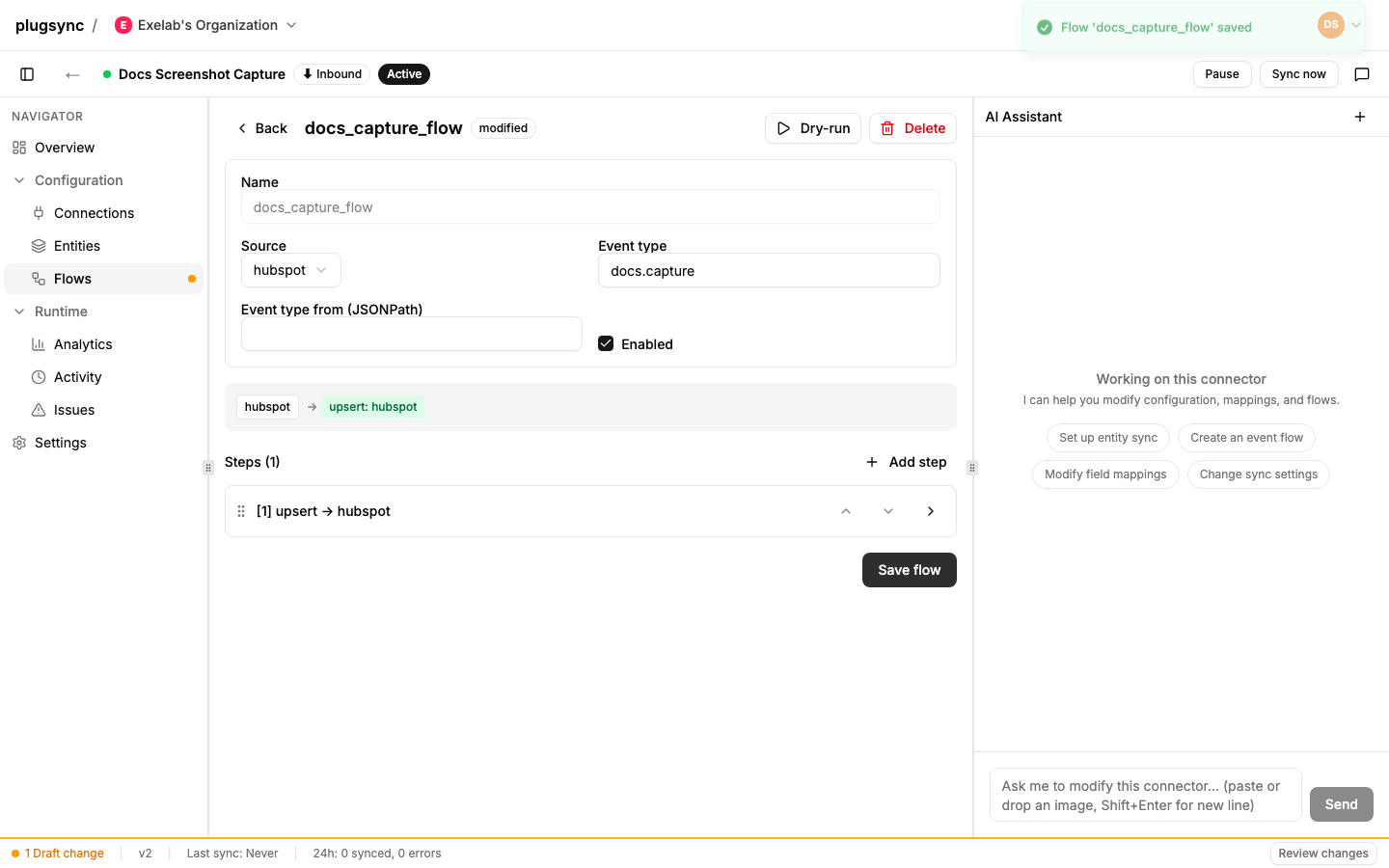
Dashboard UI as of 2026-07-11; controls may have moved by the time you read this. The underlying workflow is stable.
Click Review changes to see a diff between your draft and the currently active version:
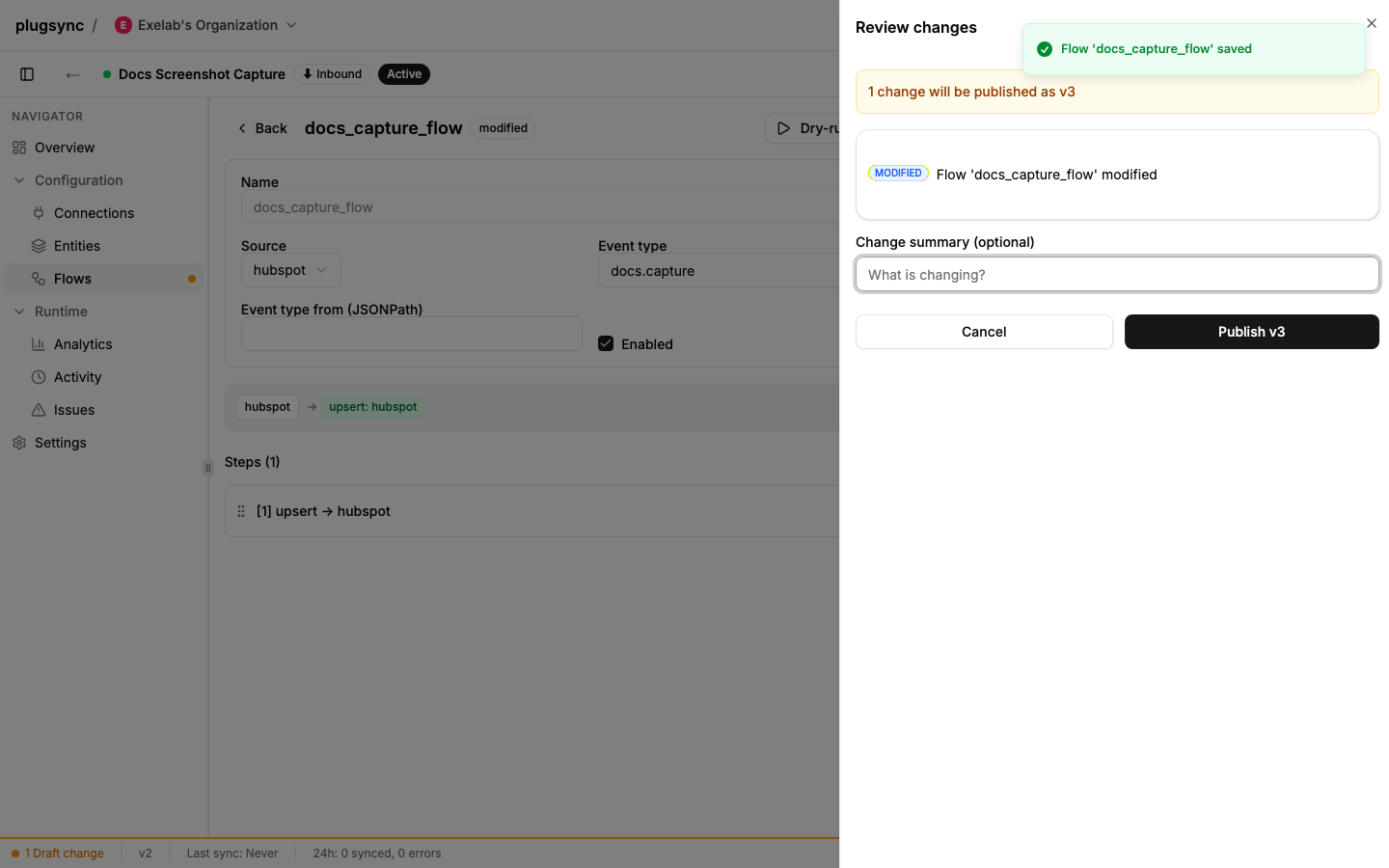
When a plugin referenced by a flow has drifted from what the active version
embeds (typically after a promote), the drawer also shows a separate
“Publishing now would also resolve to different values” panel, even when the
draft itself has no changes to publish. When the draft has no changes of its
own, that panel carries a Re-publish button: it publishes the drift as the
next version (the same forced re-publish as force: true on the API or
plugsync push --publish --republish, with the same confirmation step as a
regular publish - see “Forcing a re-publish on an identical draft” above).
With no draft changes there is no “Review changes” to click, so the status bar
at the bottom of the workspace signals it instead: it reads Re-publish
available and offers a Review re-publish button that opens the same
drawer. When the draft does have changes, no extra action is needed: the
regular Publish re-resolves them too.
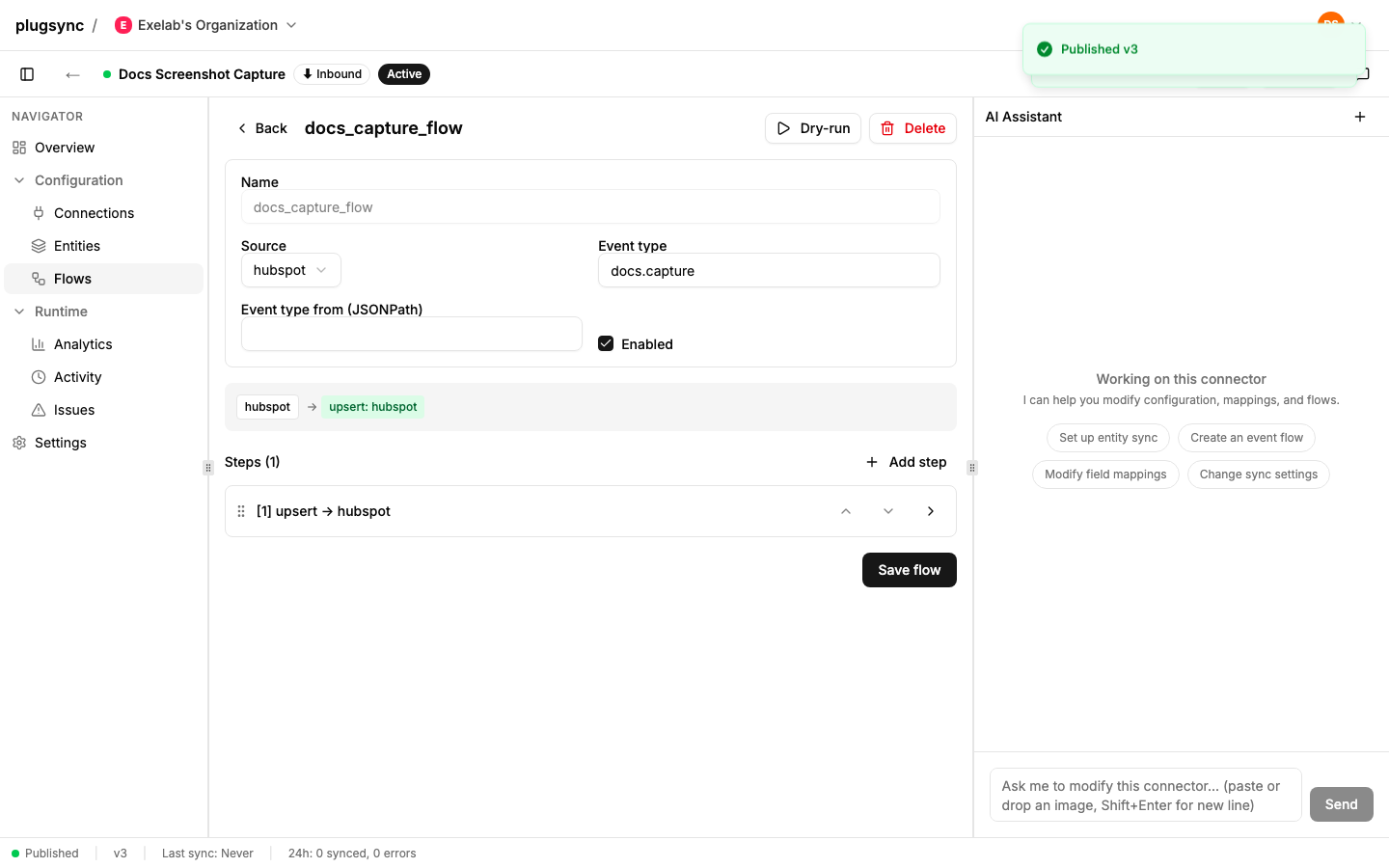
Click Publish to commit the new version. The banner disappears and the version label updates:
Config size limit
A published version is compiled into one runtime document: the config itself plus the manifest generated from each of its flows, so every flow counts twice. That compiled size has a limit of 350 KB. The size of a config grows with entities, field mappings, flows and steps; a typical connector stays well below 100 KB.
-
From 80% of the limit (280 KB) the draft is still saved normally, and every draft response (
GET,PUTandPATCHon/draftand on its granular endpoints) carries a warning inwarnings:{ "warnings": [ { "code": "config_size_near_limit", "message": "The compiled config is 301.2 KB of the 350.0 KB limit (86%). ...", "size_bytes": 308429, "limit_bytes": 358400 } ] }GET /api/connectors/{id}/preflightreports the same finding, and so does thewarnings[]of a successfulPOST /publish. -
Over the limit the draft is still saved (the warning code becomes
config_too_large, and preflight reports it as an error), but the publish is refused with HTTP 422 and no version is created. The active version keeps running unchanged:{ "detail": { "error": "config_too_large", "message": "The compiled config is 362.8 KB of the 350.0 KB limit (104%). It cannot be published: ...", "size_bytes": 371507, "limit_bytes": 358400 } }
The size is measured on the config as it will be published, so the number
you see in the draft warning is the number the publish checks (the publish
also embeds the resolved plugin coordinates, a few hundred bytes per plugin
step).
What to do when a config approaches the limit:
- Remove what the connector no longer uses: entities with no flow writing
them, field mappings for properties nobody reads, flows for event types the
source stopped sending,
when/transformsteps left over from a migration. - Move long static values (lookup tables, large templates) out of the config into a plugin, which is stored and versioned on its own.
- Split the integration across two connectors, for example one per source system or one per group of entities. Each connector has its own limit.
Concurrency
The draft records the version that was active when it was started, as
base_version (shown in GET /draft); you never send it. If your draft was
started when version 3 was active but someone else published version 4 in
the meantime, POST /publish fails with HTTP 409 and
{"detail": {"current_active_version": 4, "your_base_version": 3}}, and the
dashboard shows the DraftConflictModal:
- Reset draft: drop your changes and start from version 4
(
POST /api/connectors/{id}/draft/reset). - Keep editing: keep your draft as it is; you’ll resolve manually.
Concurrent edits to the draft itself are a separate check. Every draft write
endpoint accepts an optional expected_version query parameter, compared
with the draft’s draft_version (also in GET /draft, bumped by each
write): on a mismatch the write is refused with HTTP 409 and
{"detail": {"error": "draft_version_conflict", "current_version": N}}.
Without the parameter the write applies over whatever is there.
Publish review
A publish can create custom properties and pipelines on your live HubSpot portal, and HubSpot cannot rename them or fully remove them afterwards. The publish review lists what a publish would create, so it can be checked before anything reaches the portal. The dashboard shows it in the Review changes drawer.
| Endpoint | Verb | Purpose |
|---|---|---|
/api/connectors/{id}/publish-review | GET | What the publish would create, and whether it needs a confirmation. |
/api/connectors/{id}/publish-review/confirm | POST | Confirm the review for the current draft revision. |
{
  "policy": "dry_run_required",
  "draft_version": 17,
  "required": true,
  "confirmed": false,
  "artifacts": [
    { "kind": "property", "object_type": "contacts", "name": "loyalty_tier", "label": "Loyalty tier", "entity": "contact" },
    { "kind": "pipeline", "object_type": "deals", "name": "Webshop orders", "label": "Webshop orders", "entity": null }
  ],
  "volume": [],
  "volume_caveat": null
}| Field | Meaning |
|---|---|
policy | none or dry_run_required: whether a publish of this connector that creates something on the portal has to be confirmed first. |
draft_version | The draft revision the review describes. |
required | true when the policy asks for a review and artifacts is not empty: only then is the publish held until you confirm. |
confirmed | true when the current draft revision has been confirmed. |
artifacts | What the draft would create that the active version did not declare: property (with the entity that maps it) or pipeline (name is the pipeline label). Read from the config alone, without a call to the portal. Properties HubSpot or an app reserves (hs_ and app-prefixed names) are left out, because a publish never creates them; removed mappings are left out too, since removing creates nothing. |
volume, volume_caveat | On GET, empty unless you ask for them with ?include_volume=true; the confirmation returns any estimate already computed, without reading the sources again. Per source, an estimate of how many records or files the first sync would read. kind says what the number is: exact, lower_bound (only part was read, for example the first page of a poller) or not_estimable (count is then null). basis says what was measured. Filling it reads your own source systems, so it is off unless asked for, and the answer is kept for a short while. |
The GET always answers 200, whatever the policy, so you can show the
list to everyone; only required says whether the publish is held.
The confirmation gate applies only when it is enabled for your
organization; by default policy is none and no publish is held. When it
is enabled and the draft would create something on the portal, POST /publish without a confirmation of the current draft revision is refused
with 409:
{
  "detail": {
    "code": "publish_review_required",
    "message": "Publishing would create 1 custom property, 1 pipeline on your live HubSpot portal. HubSpot cannot rename or fully remove them afterwards, so review the list and confirm it before publishing.",
    "policy": "dry_run_required",
    "draft_version": 17,
    "artifacts": [ ... ]
  }
}
To go ahead, confirm the revision you reviewed and publish again:
curl -X POST https://app.plugsync.com/api/connectors/{id}/publish-review/confirm \
  -H "Authorization: Bearer <organization API key>" \
  -H "Content-Type: application/json" \
  -d '{"draft_version": 17}'
The confirmation answers with the review, confirmed: true. It holds for
that revision only: any later write to the draft raises draft_version and
asks for a new confirmation. Confirming a revision that is no longer the
current one is refused with 409 and detail.code stale_publish_review,
with your_draft_version and current_draft_version: read the review again
and confirm what it shows now. A publish that creates nothing on the portal,
for example one that only changes mappings to existing properties or flows,
is never held.
Both 409s carry detail.code, which is how you tell them apart from the
base version conflict above. All three are in the
error catalog.
Restore
The dashboard lets you restore an older version into the draft
(POST /api/connectors/{id}/versions/{version}/restore). Restore does
not auto-publish; it copies the old version’s config into your draft and
leaves the active version untouched. You then review and publish (or further
edit) explicitly.
Restoring a version published before this connector’s config carried
sources leaves the draft’s current source declarations alone: that version
says nothing about them, and reading its silence as “no sources” would turn
a restore into a deletion. The diff against such a version compares your
declaration with the connector’s actual sources instead, so the first
publish after the switch shows only what really changed.
Publishing from the CLI
plugsync push writes your local connector directory to the draft and stops
there: nothing is published unless you pass --publish, which runs preflight
first and refuses to publish if preflight reports an error (the draft stays
saved either way). That default is what keeps an automated push from
publishing by accident. See the CLI reference.
Related reference
- API error catalog - every error code of the draft
and publish routes, including both
409shapes ofPOST /publish. - Connector envelope
- Entities
- Flows
- Step actions
- Simple vs federated